Feedback widget
Feedback widget for SaaS: add it with one JavaScript snippet
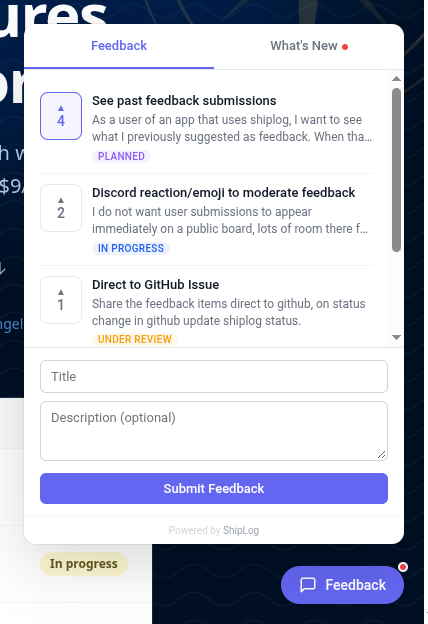
Users post requests and vote on them without leaving your app, and a What's New tab shows what you shipped. Two script tags, no build step, under 20KB gzipped.
Feedback widget
Users post requests and vote on them without leaving your app, and a What's New tab shows what you shipped. Two script tags, no build step, under 20KB gzipped.
Paste both tags before </body>
on every page, and replace yourapp
with the project slug from your Settings page.
<script src="https://app.shiplog.ca/widget/shiplog-widget.js"></script>
<script>ShipLog.init({ projectSlug: 'yourapp' })</script>
Load the script with next/script
and call init
once it has loaded. onLoad
needs a client component.
// components/shiplog-widget.tsx
"use client";

import Script from "next/script";

export function ShipLogWidget() {
  return (
    <Script
      src="https://app.shiplog.ca/widget/shiplog-widget.js"
      strategy="afterInteractive"
      onLoad={() => (window as any).ShipLog.init({ projectSlug: "yourapp" })}
    />
  );
}

// app/layout.tsx: render <ShipLogWidget /> inside <body>Paste this prompt into your coding agent and it will add the widget for you.
Add the ShipLog feedback widget to this app. Load
https://app.shiplog.ca/widget/shiplog-widget.js once on every page, and call
ShipLog.init({ projectSlug: "yourapp" }) only after that script has loaded:
a plain <script src> followed by an inline <script> in plain HTML, or
next/script with strategy="afterInteractive" and an onLoad handler in a
client component for Next.js. Do not add `defer` to a tag that an inline
init follows. There is no npm package; do not install one. Replace "yourapp"
with my project slug from ShipLog's Settings page.Themes, display modes, callbacks and signed-in users are all in the widget reference , with a live demo you can try on the page.
Free for one project with 10 feedback items and 10 changelog entries, no credit card. Captain is $9 USD/mo per project when you need more.